Find an exchange office and check before visiting
Search BAKUO by business name or area to inspect registration details and locations. Once you have a shortlist, ask the office about its actual rate, available currencies, and opening status.
This guide follows the search, list, and map screens observed on the public service on 4 November 2026. Records and screen layouts may change.
1. Search by area or business name
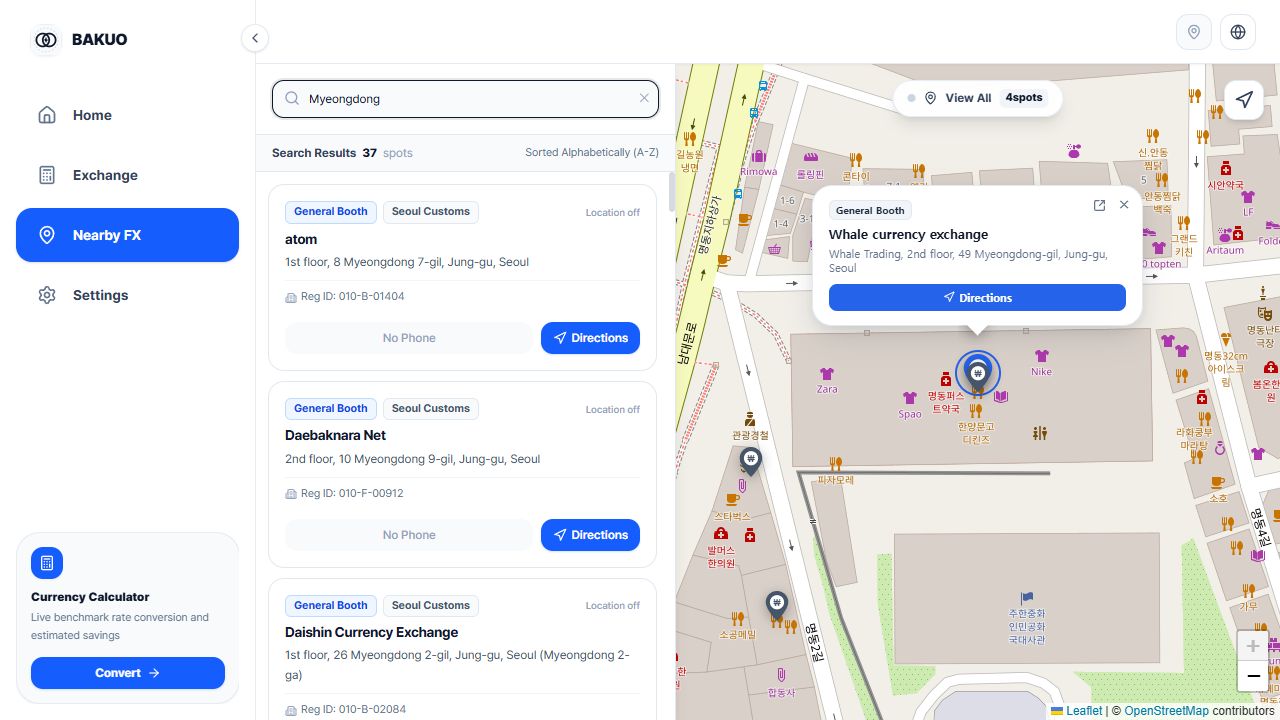
On Nearby FX, enter an area, part of an address, or a business name. A match may occur anywhere in the address, so check the city, district, and street rather than relying on the name alone.
When search is restricted to the visible map area, you may see fewer results or none. Switch Search This Area to View All, then check the query. You can browse names and addresses without allowing location access.
- Open Nearby FX in BAKUO.
- Enter the area you plan to visit or a business name.
- If there are no results, switch the map-area filter to View All and try a shorter query.
- Select a candidate from the list and compare its address with the map location.
2. Separate registration details from visit conditions
The name, address, and registration number help you distinguish one office from another. A registration record does not confirm that an office is open now or has your chosen currency in stock. Compare the address and registration number when several businesses share a name.
A displayed distance based on map coordinates can differ from the route you need to walk. Check the entrance, floor, and walking route using an external map and the office instructions.
- Check the candidate name and address.
- If needed, compare the registration details and publication date with Korea Customs Service records.
- If a phone number is available, ask about opening status on your visit date, the currency, and the amount.
- Before following directions, check that the destination address matches the selected office.
3. Distinguish a calculation from an office quote
The benchmark-rate calculation on the home or calculator screen is a reference for starting a comparison. Check its displayed date first. Cash exchange rates, fees, and available banknote denominations can change the final amount you receive.
Ask different offices about the same currency and amount. When buying foreign currency, confirm both the total KRW payment and the foreign currency you will receive; this is easier to compare than a preferential-rate percentage alone.
- Check the selected currency and the rate date on the calculation screen.
- Ask the office about a specific KRW payment or foreign-currency amount.
- Confirm fees, the required banknote denominations, and the final transaction amount.
If search or location behaves unexpectedly
Do I have to allow location access?
No. You can search business names and addresses without location permission. Without a location fix, distance labels and nearest-first sorting are unavailable, so check the result addresses directly.
There are no search results.
Try part of an area or business name. If Search This Area is active, switch to View All. A business may be absent from the dataset or listed under another name, so no result alone does not establish that it is unregistered.
There is no phone number or opening time.
Public records do not contain every detail needed for a visit. Check an external map or official information from the office for contact details and hours. Do not assume that an office is open when that information is missing.
The actual exchange amount differs from the benchmark calculation.
Check the reference date, currency unit, and whether you are buying or selling cash. A benchmark rate is not an office quote. Ask the office for the actual applied rate and final amount including fees.